Frequently Asked Questions
Quick answers to the most common questions.
Getting Started
How do I get a Telegram bot token?
- Open Telegram and search for @BotFather
- Send
/newbot - Follow the prompts to choose a name
- Copy the token BotFather gives you
Can I have multiple bots?
Yes! Each bot needs its own token and project. You can create as many bots as your plan allows.
How quickly do changes go live?
Immediately after saving. There's no separate "deploy" step — save and test!
Building Bots
How do I make my bot respond to any message?
Use the trigger.on node with the filter message:text. This is the modern, recommended approach:
- Add a trigger.on node
- Set filter to:
message:text - Connect it to your response
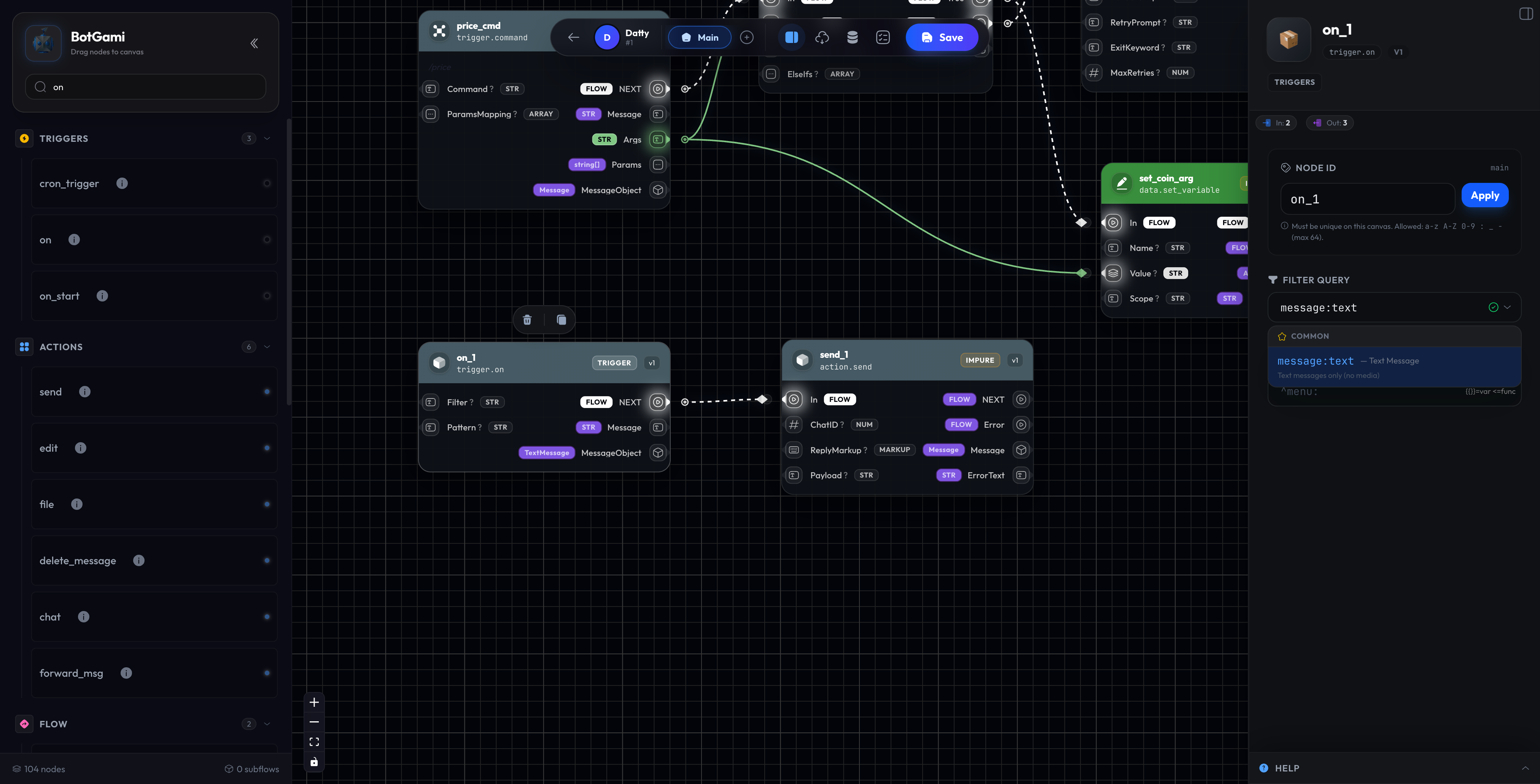
This will catch all text messages. For more specific filtering (like photos, locations, etc.), see the trigger.on guide →
How do variables work?
Variables store data. Use:
var.*for per-user data that persistsflow.*for temporary data within one flowuser.*for Telegram user info (read-only)
What's the difference between Reply and Inline keyboards?
| Reply Keyboard | Inline Keyboard |
|---|---|
| Replaces user's keyboard | Attached to a message |
| Sends text as message | Triggers callbacks |
| Good for menus | Good for actions |
How do I send a message to a specific user?
Use a Send Message node and connect the user's chat ID to the ChatID input.
Can I send photos and files?
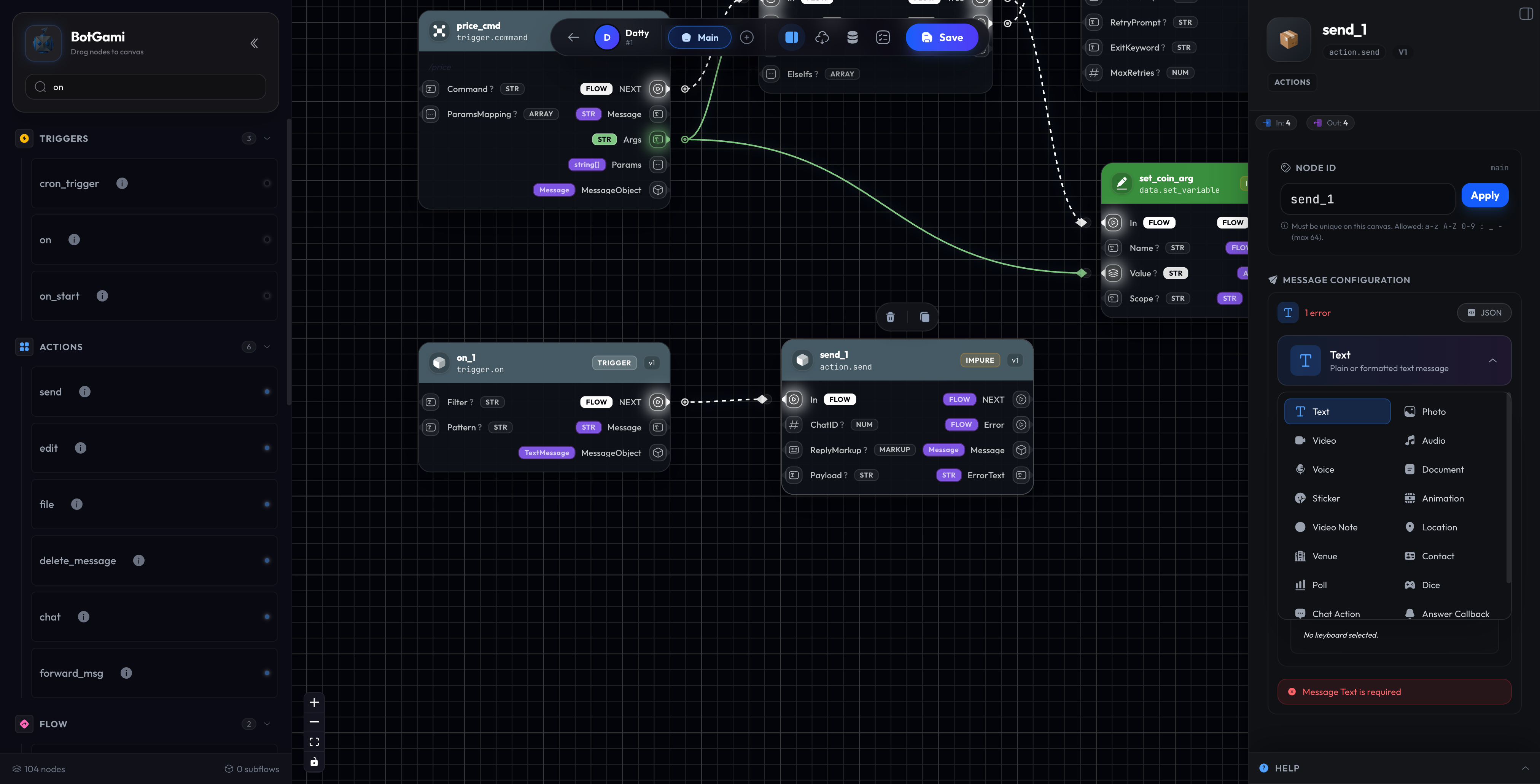
Yes! Use the action.send node (recommended) or specific nodes:
Using action.send (Unified):
- Add action.send node
- Set Mode to Photo, Document, or Video
- Provide URL or File ID
Pro Tip: For galleries or file selectors, check out Menu Nodes → for interactive file browsing!
Troubleshooting
Why isn't my bot responding?
Common causes:
- Bot token is invalid or changed
- Trigger isn't matching the input
- A condition is blocking the flow
- Changes weren't saved
Why do I see "Variable not found"?
The variable hasn't been set yet. Make sure to set it before using it, or handle the "Not Found" case.
How do I debug my flows?
Add Send Message nodes to print variable values:
Debug: var.name = {{var.name}}
Remove them after debugging!
Limits & Performance
How many users can my bot handle?
BotGami is built for scale. Most bots can easily handle thousands of concurrent users.
Are there message limits?
Telegram has rate limits (about 30 messages/second per bot). BotGami handles this automatically, but very high-volume broadcasts may take time.
Is my data secure?
Yes. We use encryption for data at rest and in transit. Bot tokens and user data are stored securely.
Advanced
Can I call external APIs?
Yes! Use the HTTP Request node to call any REST API.
Can I schedule messages?
Yes! BotGami has built-in scheduling:
For Single Delayed Messages:
- Use flow.schedule_message — schedule a one-time message for later
For Complex Scheduling:
- Use flow.schedule to trigger any flow at a specific time
- Use sys.cron_trigger for recurring schedules (daily, weekly, etc.)
For Simple Delays:
- Use flow.delay for short waits (seconds/minutes)
[Screenshot: flow.schedule_message node showing datetime picker]
Can multiple flows run at once for a user?
Generally, one flow runs at a time per user. When a new trigger fires, it may interrupt an ongoing flow.
What's the difference between menus and keyboards?
Menus (Inline Keyboards):
- Buttons appear below messages
- Handle complex navigation (wizards, pagination)
- Use
menu.*nodes for multi-step flows - Better for guided experiences
Reply Keyboards:
- Replace the user's keyboard
- Simple button responses
- Good for main menus
- Use
reply_keyboardin action nodes
[Screenshot: Side-by-side comparison of inline menu vs reply keyboard]
Keyboards guide →
Menu nodes guide →
How do I handle errors in my flow?
Use the Error output on nodes that can fail:
- Many nodes have an
Erroroutput (HTTP requests, file operations) - Connect it to error handling logic
- Send user-friendly messages or retry
Example:
[HTTP Request] --Error--> [Send Message: "Sorry, service unavailable"]
[Screenshot: HTTP node showing both Success and Error output sockets]
Can I test my bot before going live?
Yes! Your bot is always live for testing:
- After each save, changes apply immediately
- Test in a private Telegram chat with your bot
- Use a test Telegram account to avoid interrupting real users
- Add debug.log nodes to print values during testing
Pro Tip: Create a /debug command that only you can use for admin actions!
What are Pure vs Impure nodes?
Pure Nodes (Data):
- No side effects (don't send messages, save data, etc.)
- Examples:
data.string,data.transform - Auto-execute when their output is needed
- No FLOW input connection required
Impure Nodes (Actions):
- Have side effects (send messages, call APIs, save data)
- Examples:
action.send,http.request - Must be connected via FLOW input
- Won't execute unless explicitly triggered
[Screenshot: Diagram showing Pure node (no FLOW in) vs Impure node (FLOW in required)]
This matters when connecting nodes — data nodes pull data automatically, action nodes need explicit flow control!
When should I use subflows (functions)?
Use subflows when you have:
Repeated Logic:
- Same sequence of nodes used multiple times
- Example: "Format user greeting" used in 5 places
Complex Flows:
- Breaking down large flows into manageable pieces
- Example: Checkout → Separate function for "Calculate Total"
Reusable Components:
- Share logic across different bots
- Example: "Send Email Notification" function
[Screenshot: Editor showing a subflow tab next to main flow tab]
Why do I see "Node not reachable" error?
This means the node isn't connected to any trigger via FLOW connections:
Common Causes:
- Forgot to connect the FLOW input (left side white dot)
- Node is isolated on the canvas
- Conditional branch prevents execution
Fix:
- Trace backward from the node to a trigger
- Ensure FLOW connections (wires) are complete
- Check analysis panel for specific guidance
[Screenshot: Analysis panel showing "Node 'send_welcome' is not reachable from any trigger"]
How do I debug "Variable not found" errors?
Check These:
-
Variable Scope:
var.*— Persistent user dataflow.*— Current flow only (cleared after)ctx.*— Current node execution only
-
Set Before Use:
- Use
data.set_variablebefore reading - Or handle the "Not Found" output from
data.get_variable
- Use
-
Spelling:
- Variables are case-sensitive:
var.Name≠var.name
- Variables are case-sensitive:
Debug Pattern:
[Get Variable] --NotFound--> [Send: "Please register first!"]
[Get Variable] --Found--> [Continue flow]
[Screenshot: data.get_variable node showing Found and NotFound output sockets]
Why isn't my condition working?
Common Mistakes:
-
Type Mismatch:
- Comparing number to string:
"18"≠18 - Use
data.asto convert types
- Comparing number to string:
-
Wrong Operator:
=assigns,==compares- Use
>=not=>for "greater than or equal"
-
Empty Values:
- Check for null/empty:
var.age != null
- Check for null/empty:
-
Expression Syntax:
- Template:
{{var.age}} - Expression:
var.age >= 18(no brackets)
- Template:
[Screenshot: logic.condition node config showing expression field with correct syntax]
Debug Tip: Add a debug.log node before the condition to print the values!
Account & Billing
How do I upgrade my plan?
Go to Settings → Billing in the app.
What happens if I cancel?
Your bots will stop working after the billing period ends. Data is retained for 30 days.
Still Have Questions?
Getting Help → — How to reach our support team